AI products are often shown through their best-case scenario:
Give the system an input, let the model process it, and get an accurate result in seconds, but production systems are rarely that clean.
A scanned insurance form may be slightly rotated. A field may be handwritten. A passport image may be blurred. Different versions of the same document can have different layouts. Eventually, the model becomes uncertain, and that is where an interesting UX problem begins.
I encountered this while working on an Intelligent Document Processing platform built around specialised machine-learning models. It was not a generative AI product. The models were trained for specific extraction problems, such as healthcare claim forms, dental forms, or identity documents.
The engineering challenge was clear:
Can we train the model to extract the required information accurately enough?
But once the model reached production, another question appeared:
What happens when it isn’t confident enough?
The model worked. The workflow didn’t.
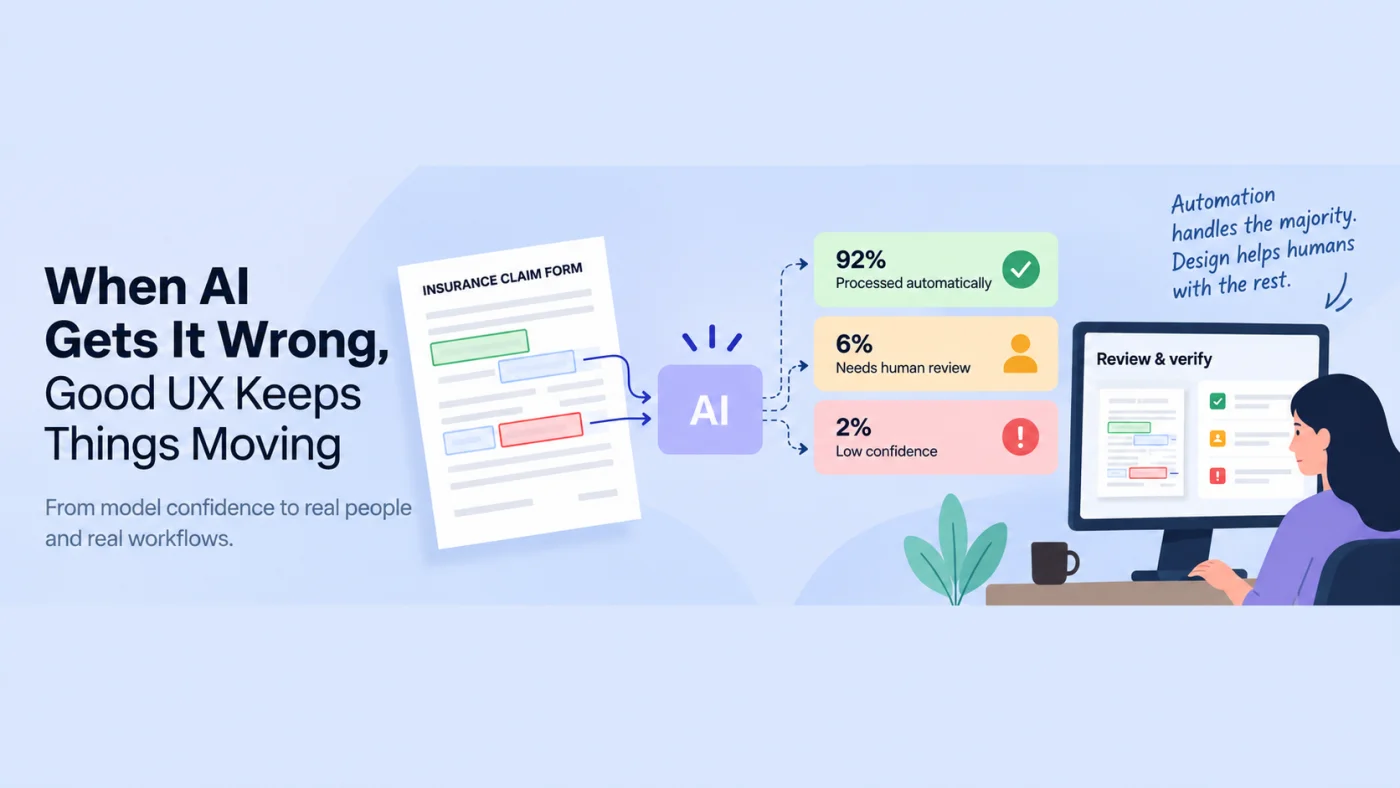
Imagine an insurance company processes 10,000 scanned claim forms; most are processed with sufficiently high confidence and continue automatically, but perhaps 800 documents contain uncertain fields.
The technology has still created enormous value. Instead of manually processing all 10,000 documents, people only need to investigate a smaller set, but someone still has to deal with those exceptions.
In the workflow I encountered, those documents might be separated and assigned to an operations or BPO team. A person would then open the original document, find the relevant information, compare it with the extracted data, and manually correct or enter it elsewhere.
The ML had automated most of the process, but the product effectively stopped where the model’s confidence dropped. That was the missing Human-in-the-Loop layer.
Human-in-the-Loop is more than adding a human
A simple HITL workflow sounds straightforward:
AI processes → uncertainty appears → human reviews → work continues
But adding a human does not automatically create a good human-AI system.
The reviewer still needs to know:
- What needs my attention?
- Which field is uncertain?
- Where is that information in the original document?
- What did the model extract?
- What should I correct?
- What happens after I approve it?
That is where UX becomes part of the AI system itself.
1. Don’t just show uncertainty. Make it actionable.
A model might produce a confidence score such as:
63.7%
That number may be meaningful to the engineering team, but it does not necessarily help an operations user.
A better interface might translate that uncertainty into:
- Needs review
- Potential mismatch
- Unable to determine
And more importantly: Review this field
The goal is not simply to expose what the machine knows. It is to tell the human where their judgement is required.
2. Don’t make people hunt for AI mistakes
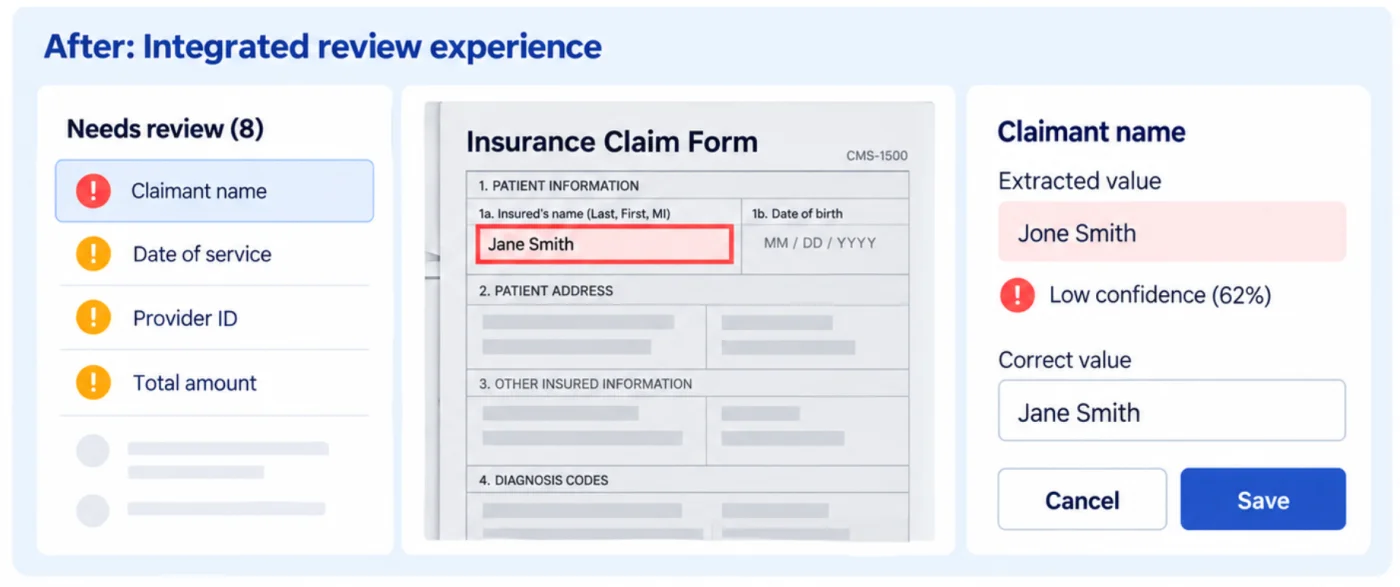
If the system already knows which fields are uncertain, the user should not have to search through a 12-page document to find them. The product can bring the source document and extracted information together, highlight the relevant area, and allow the reviewer to move quickly between exceptions.
The interaction changes from:
"Find what went wrong."
To:
"Here is where your attention is needed."
At scale, that difference matters.
3. Correction is not an edge case
Many automated systems are implicitly designed around:
Input → AI → Output → Done
Real workflows are often closer to:
Input → AI → Review → Correct → Validate → Continue
If uncertainty is expected, correction should be treated as a core workflow, and editing should be quick. Source and extracted data should be easy to compare. The user should always understand what happens after a correction is approved.
4. Automation should remove work, not relocate it
There is another interesting problem. If AI handles the easy 90% of cases, humans may be left with the most ambiguous 10%. So a high automation rate does not automatically mean a good user experience.
A better question is:
"How much work have we actually removed from the user?"
And: "What kind of work have we left behind?"
This is why designing AI products is not only about model performance. It is also about deciding where responsibility moves between machine and human.
The model isn’t the whole product
Looking back, the ML problem and the product problem were closely related, but fundamentally different.
The engineering question was:
Can the model extract the information reliably enough?
The UX question was:
How do we create an efficient workflow for the situations where it cannot?
That lesson applies far beyond document processing.
- An AI assistant gives a wrong answer.
- A fraud system flags a legitimate transaction.
- A recommendation engine makes a poor suggestion.
Different technology, same product question:
What happens when the system is uncertain or wrong?
When I think about AI-supported workflows now, I ask four questions:
- Where can the system become uncertain?
- How will the user recognise that uncertainty?
- What does the human need to do next?
- How easily can they correct and recover?
The more AI we introduce into products, the more important these questions become. Working on document-processing systems made me realise that some of the most interesting AI UX problems begin exactly where the model’s certainty ends.
The challenge isn’t only creating increasingly capable automation. It’s deciding how that automation and human judgement work together when reality becomes messy.
So as we build more AI-powered products, perhaps one of the most useful questions product teams can ask isn’t only:
"What can we automate?"
It is also:
"What experience are we creating when the automation isn’t enough?"